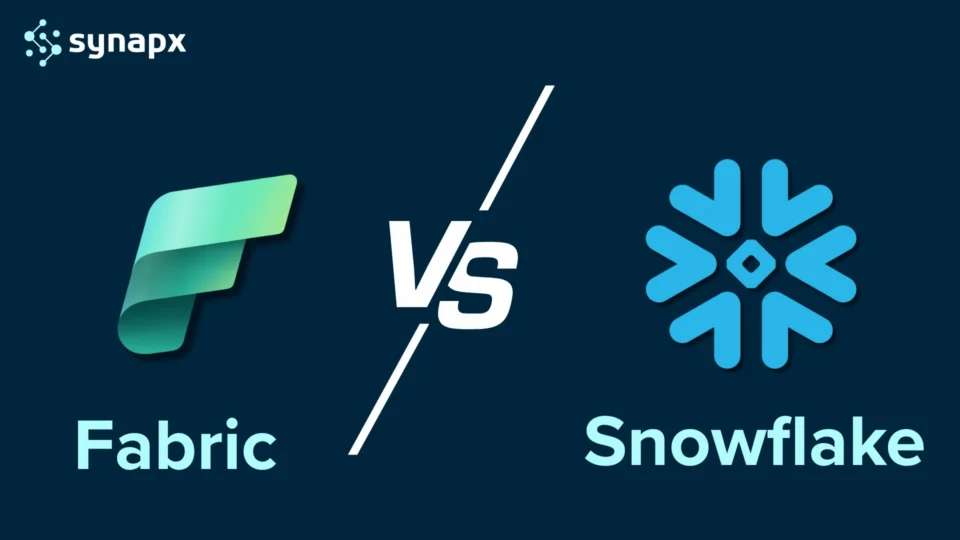
Choosing the wrong data platform in 2026 is not just an IT problem; it is a strategic one. Both Microsoft Fabric and Snowflake are mature, cloud-native, and genuinely capable. But they are built for different organisations solving different problems and conflating them leads to expensive mistakes.
This guide cuts through the noise. We compare both platforms across architecture, AI capabilities, cost, Microsoft ecosystem fit, and real-world use cases, so you can make the right call for your organisation, not the most popular one.
What is Microsoft Fabric?
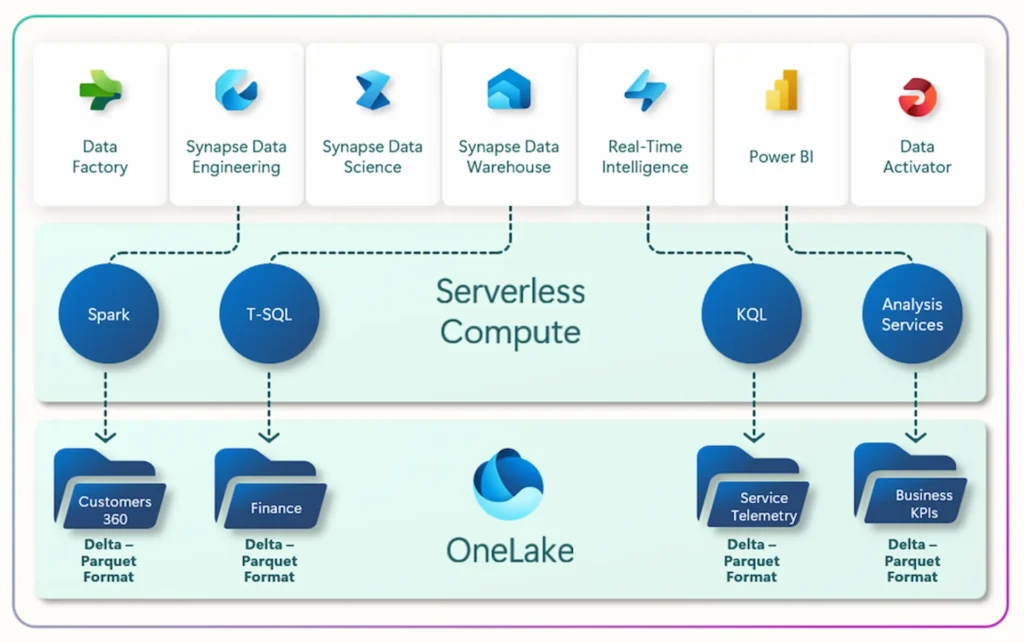
Microsoft Fabric is a comprehensive, unified analytics platform designed to address the end-to-end data and analytics needs of an organisation. It integrates various data-related services into a single, cohesive environment, simplifying the complexities often associated with disparate analytics tools. Think of it as an all-in-one solution for everything from data ingestion and storage to data engineering, data science, real-time analytics, and business intelligence.
- Unified SaaS platform for data engineering, data science, real-time analytics, business intelligence, and more.
- Built natively on the Lakehouse architecture (OneLake).
- Deeply integrated with Power BI, Azure, Office 365.
What is Snowflake?
Snowflake is a fully managed Software-as-a-Service (SaaS) data warehouse built for the cloud. It provides a platform where organizations can consolidate vast amounts of structured, semi-structured, and unstructured data to gain valuable insights. Unlike traditional data warehouses, Snowflake separates its compute and storage layers, allowing them to scale independently. This unique architecture offers flexibility, performance, and cost-efficiency.
- Cloud data warehouse focused on scalable storage and compute.
- Great at structured data, SQL analytics, and marketplace data sharing.
- Multi-cloud (AWS, Azure, GCP).
Quick Comparison: Fabric vs Snowflake at a Glance
| Feature / Area | Microsoft Fabric | Snowflake |
| Architecture | Unified SaaS + Lakehouse (OneLake) | Cloud Data Warehouse (MPP) |
| Data types | Structured, semi-structured, unstructured | Primarily structured & semi-structured |
| AI & ML | Built-in Copilot, AutoML, Azure OpenAI | Snowpark ML + partner integrations |
| Business intelligence | Native Power BI — no extra licence needed | Requires Power BI, Tableau, or Looker |
| Microsoft 365 integration | Native — Teams, SharePoint, Excel | Requires separate connectors |
| Billing model | Unified capacity-based (F SKUs) | Separate compute + storage credits |
| Developer experience | Low-code, Notebooks, Pipelines, SQL | Primarily SQL and Python |
| Governance | Microsoft Purview — built in | Snowflake-native + external tools |
| Multi-cloud | Azure-primary (connectors to AWS/GCP) | True multi-cloud: AWS, Azure, GCP |
| Best for | Microsoft-stack organisations | Multi-cloud or non-Microsoft environments |
Microsoft Fabric – Core Architecture and Concepts
1. Software-as-a-Service (SaaS) Model
Fabric is built as a fully managed SaaS solution, removing the complexity of setting up and maintaining infrastructure. Users can focus on data-driven insights instead of backend operations, making analytics more accessible and efficient.
2. OneLake: Unified Data Storage
At the centre of Fabric is OneLake, a single, logical data lake for the entire organisation. Designed for multi-cloud environments, OneLake eliminates data silos by automatically connecting all Fabric workloads. It uses Delta Lake as the underlying format, combining a data lake’s flexibility with a warehouse’s performance.
3. Specialised Workloads
Fabric includes dedicated modules for:
- Data Factory – Orchestrates data integration and transformation workflows.
- Data Engineering – Offers a Spark-powered environment for building pipelines and processing large datasets.
- Data Science – Supports model development and deployment, integrated with Azure Machine Learning.
- Data Warehouse – Delivers a scalable, SQL-based analytical engine built on the Lakehouse model.
- Real-Time Intelligence – Processes and analyses streaming data for immediate insights.
- Power BI – Enables the creation of interactive dashboards and reports directly from Fabric data.
- Data Activator – A no-code solution for monitoring data and triggering actions based on real-time changes.
- Databases – Allows inclusion of operational databases like Azure SQL Database for transactional workloads.
4. Independent Compute and Storage
Fabric allows compute and storage resources to scale independently, especially in workloads like Data Warehouse, enabling performance optimisation while managing costs effectively.
5. Deep Microsoft Integration
Fabric works seamlessly with Microsoft 365, Azure OpenAI, Azure services, and Microsoft Purview, ensuring tight alignment with governance, AI, and productivity tools.
Key Benefits of Microsoft Fabric
- Unified Experience: Microsoft Fabric brings all analytics tools and services together within a single, integrated platform. This streamlines operations, reduces the need for complex integrations, and provides a consistent user experience across data engineering, business intelligence, and more.
- OneLake BCDR and Data Protection: When Business Continuity and Disaster Recovery (BCDR) is enabled for OneLake, data is geo-replicated across two separate regions to ensure high availability and resilience. Additionally, OneLake includes soft delete functionality, retaining deleted files for 7 days before permanent removal, helping safeguard against accidental deletion. Soft-deleted data is billed at the standard storage rate.
- Workspace Retention: When a Microsoft Fabric workspace is deleted, all its contents, including reports, datasets, and notebooks, are retained for a configurable period of 7 to 14 days. This retention window allows for recovery of accidentally deleted workspaces before permanent removal.
- Lakehouse-Centric: By centralising data in OneLake using open formats like Delta Lake, Fabric promotes a “single source of truth” and eases data sharing.
- Built-in AI and Copilot: AI tools are embedded across the platform, enabling users to write code, build models, or generate visuals using natural language.
- Cross-Team Collaboration: A shared environment encourages cooperation between data engineers, scientists, analysts, and business users.
- Elastic Scalability: Built on Azure, Fabric scales on demand to handle everything from small workloads to enterprise-scale analytics.
- Governance and Compliance: With Microsoft Purview integration, organisations get visibility into data lineage, policies, and access controls across all assets.
- Cost Efficiency: Consolidated services, shared storage, and compute/storage decoupling help reduce redundancy and control costs.
- Open and Connected: Fabric supports open source formats and integrates with a wide array of external data sources and platforms.
Snowflake – Core Architecture
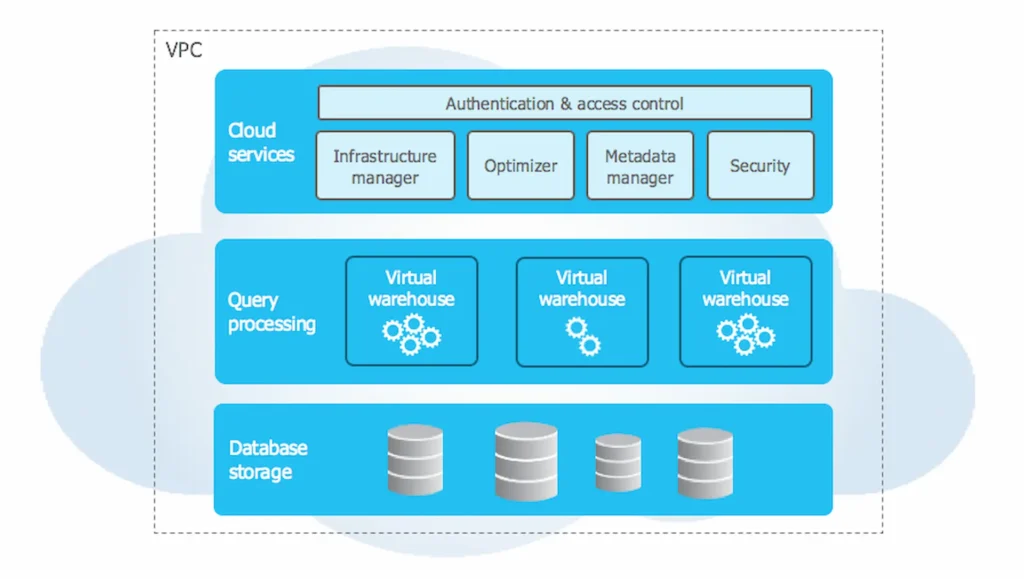
Snowflake’s architecture is composed of three decoupled yet tightly integrated layers:
1. Storage Layer
When data is ingested into Snowflake, it is automatically converted into a compressed, columnar format optimised for performance. This data is stored in cloud storage (e.g., AWS S3, Azure Blob, or Google Cloud Storage), and Snowflake handles all aspects of data management, including compression, organisation, indexing, and metadata. Users interact with data through SQL, not directly with the storage layer.
2. Compute Layer (Virtual Warehouses)
All queries and data processing in Snowflake are handled by virtual warehouses, independent clusters of compute nodes. These can be scaled up or down depending on the workload and run in isolation, ensuring that heavy queries in one warehouse don’t affect others. This massively parallel processing (MPP) design enables high concurrency and consistent performance.
3. Cloud Services Layer
This top layer coordinates the platform’s activities. It manages user authentication, metadata, infrastructure orchestration, query parsing, optimisation, and overall security. It acts as the “brain” that connects compute and storage into a seamless experience for users.
Key Features and Capabilities of Snowflake
- Independent scaling of compute and storage
- Multi-cluster shared data architecture
- Automatic elasticity
- Support for all data types
- Secure data sharing
- Zero-copy cloning
- Time travel
- Fail-safe recovery
- Advanced security and governance
- Data marketplace
- Cross-cloud compatibility
- Intelligent query optimisation
When to Choose Microsoft Fabric
- You are already invested in the Microsoft ecosystem – Azure, M365, Dynamics, Teams
- You want Power BI as your BI layer – it is included natively
- You want to consolidate multiple analytics tools under one licence and governance framework
- You want AI accessible to business users, not just data scientists
- You are migrating from Power BI Premium to a scalable, future-ready platform
When to Choose Snowflake
- You operate across multiple cloud providers and need true multi-cloud portability
- Your organisation is not primarily Microsoft-based with no significant Azure investment
- You have high-concurrency SQL workloads requiring truly independent compute scaling
- Your primary users are skilled data scientists and engineers comfortable with SQL and Python
AI Capabilities: Where the Platforms Diverge
AI is where the gap becomes most visible, not in theoretical capability, but in day-to-day accessibility.
Microsoft Fabric’s Copilot is embedded across every workload: helping engineers write Spark code, analysts build DAX formulas, and business users generate reports through natural language. Azure OpenAI integration means AI is enterprise-grade, governed, and connected to the organisation’s own data.
Snowflake’s Snowpark ML is a Python-based framework for building and deploying ML models directly within Snowflake without moving data. It is powerful for data science teams but requires Python expertise and is less accessible to non-technical users.
If your goal is to make AI accessible to business users and citizen developers, Fabric’s embedded Copilot is significantly ahead. If your goal is best-in-class ML for expert data science teams, Snowflake’s Snowpark ML is a credible alternative.
Pricing: What You Will Actually Pay
Fabric pricing is capacity-based. One F SKU subscription unlocks all Fabric workloads -Power BI, data engineering, warehousing, AI under one bill. No separate BI licence. No separate compute charge.
| Fabric SKU | Capacity Units | Est. Monthly Cost (GBP) | Best For |
| F2 | 2 CU | ~£200 | Proof of concept, small team |
| F4 | 4 CU | ~£400 | Small production workloads |
| F8 | 8 CU | ~£800 | Mid-size teams, dashboards |
| F16 | 16 CU | ~£1,600 | Enterprise analytics |
| F64 | 64 CU | ~£6,400 | Multi-team, AI pipelines, no per-user Pro licences |
Snowflake separates storage (per TB/month) from compute (credits per warehouse-hour). For predictable, high-volume workloads the model offers cost control. For varied workloads without careful governance, costs can escalate.
For Microsoft-stack organisations, Fabric almost always delivers better total cost of ownership, replacing separate Power BI Premium, Synapse, and Data Factory licences with a single capacity subscription.
Ready to Streamline Your Data Stack?
If you’re evaluating your analytics strategy, now is the time to rethink complexity. Microsoft Fabric isn’t just another tool, it’s a future-ready platform that consolidates your data warehousing, business intelligence, machine learning, and real-time analytics into a single, cost-efficient ecosystem. Whether you’re a mid-sized business or an enterprise, the unified experience and seamless integration with Microsoft tools make it an incredibly compelling choice.
The Synapx Perspective
As a Microsoft Fabric Featured Partner, we work with organisations across financial services, construction, professional services, and insurance. In the vast majority of UK enterprise contexts, where Microsoft 365 and Azure are already the foundation, Fabric delivers faster time to value, better governance, and lower TCO than Snowflake.
That said, the right answer is always the right answer for your organisation. If you are running a multi-cloud environment, are Salesforce-centric, or have an existing Snowflake investment delivering value, we would not recommend migrating for migration’s sake.
Not sure which platform is right for your organisation? Our team offers a no-obligation data platform assessment. Get in touch with Synapx to book yours.